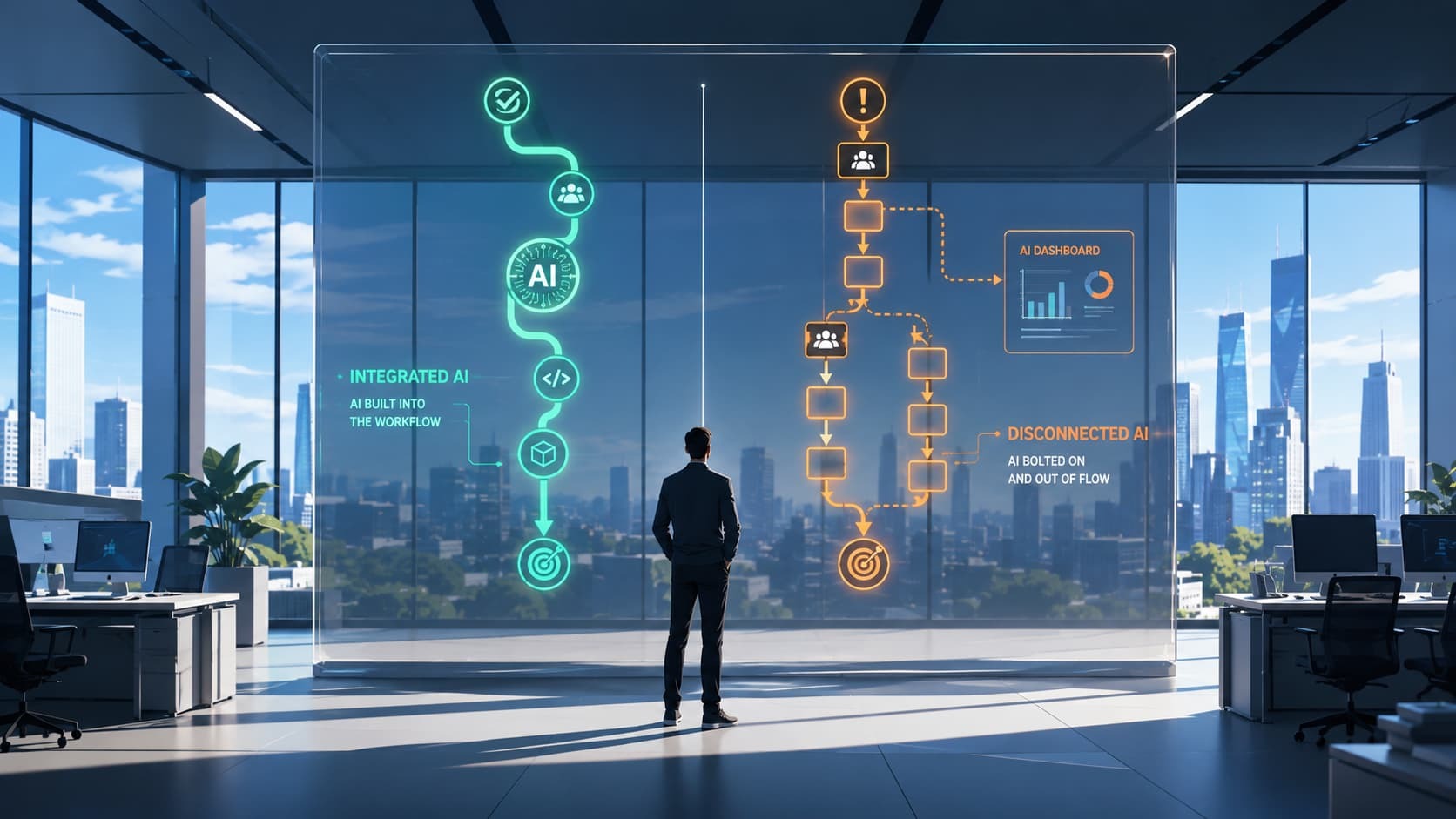
A VP of Operations at a B2B software company called me a few weeks ago. Three months earlier, her team had rolled out an AI ticket summarizer for the support organization. The pilot had gone well. Resolution time projections looked promising in the demo. Procurement signed off. The tool went live in the queue.
When I asked how it was going, she paused. "The agents read the AI summary. Then they read the original ticket anyway. Just to be sure."
Median resolution time had not moved. The AI was running. The work was running. They were running side by side, and nobody had told the old process to step aside.
This is the most common AI failure mode I see in the field right now. Not bad models. Not bad data. Just AI added on top of work that nobody redesigned.
What "embedded" actually means
There is a useful distinction here that gets lost when people throw around the word "AI strategy."
Bolted-on AI lives in a new place. A separate dashboard, a separate tab, a separate Slack bot, a separate login. It runs alongside the old process, which keeps running. People have to leave what they were doing to use it, then come back to where the actual work happens. When the AI is wrong, they fall back to the old way. When the AI is right, they still cross-check the old way. The total work goes up, not down.
Embedded AI lives inside the existing tool, at the exact moment the work actually happens. The old step is gone. There is no parallel process to fall back to, because the workflow has been redesigned so the AI step IS the step.
Philips' Illumeo tool for radiologists is the canonical example. The AI does not live in a new interface. It quietly sits inside the radiologist's existing reading software, surfaces relevant patient context next to the image, and even suggests the right toolset based on the anatomy it recognizes. The radiologist does not "switch to AI." The work just gets easier inside the place where the work already happens.
Source: Daugherty and Wilson, Human + Machine, ch. 6.
The bolted version of the same product would have been a separate dashboard, hosted somewhere else, where the radiologist would have to manually look up the patient, paste in the image ID, and then translate the output back into their actual reading software. That product would have been abandoned within a quarter.
Why this keeps happening
The reason most rollouts end up bolted-on is not technical. It is organizational. When the AI vendor demos the product, what they are selling is a model and an interface. They are not selling the redesign of your work. Nobody at the demo is responsible for retiring the manual step that the AI is supposed to replace. So when the tool ships, the manual step is still there. The people doing the work, sensibly, do both.
Davenport and Mittal name this pattern directly in All-In on AI. Successful AI deployments share three traits: deployment is planned from day one, a single person owns both development and rollout, and product managers work with business-side stakeholders from the beginning. In the failing ones, deployment is "considered someone else's job, though it is often not clear whose."
Source: Davenport and Mittal, All-In on AI.
Afshar and King in Autonomous are more blunt. When work is not redesigned around the tool, "automation becomes a cosmetic layer on top of legacy problems." Faster execution, same structure, same bottlenecks.
Source: Afshar and King, Autonomous.
This is the same dynamic we covered in why most AI projects stall after the pilot. The pilot is contained, well-scoped, well-supervised. The rollout is the moment of truth where the workflow either bends or it does not.
Five ways to embed AI in the work, not on top of it
This is not a maturity model. These are five specific moves that, in my experience, separate AI that lives inside the work from AI that runs next to it.
1. Map the actual work, not the org chart
Before you decide where AI fits, watch one person do the workflow for an hour. Not a process flow document. Not what you think the workflow is. Sit next to the person and write down each thing they do, including the tabs they switch between, the spreadsheet they paste into, the second monitor they reference, the manager they DM when they are unsure. The real workflow is almost always different from the documented one. Your AI insertion point is the highest-friction step that the person can describe in one sentence.
2. Put AI where the user already is
If the AI lives somewhere the user has to navigate to, it will be used three times and then forgotten. Embed it inside the tool they already open every day. Inside the ticketing system. Inside the IDE. Inside the spreadsheet. The Illumeo design principle holds: the AI should slide into the preexisting interface, not replace it. The same logic applies to AI-assisted coding, which we walked through in detail in the vibe coding hangover.
3. Define the handoff explicitly
Janna Lipenkova in The Art of AI Product Development describes three useful autonomy levels for AI in a workflow: fully automated (the AI acts, no human reviews), assisted AI (the agent suggests, the human approves), and human-in-the-loop (the AI does part, the human does part, with a defined boundary). Pick one per workflow. Write it down. Tell the team. Ambiguous handoffs are the number one reason people end up doing both the AI step and the manual step.
Source: Lipenkova, The Art of AI Product Development.
4. Pick one decision AI can actually own
If the AI does not own a decision, it is decoration. "AI suggests a draft response" is decoration if the agent always rewrites it. "AI routes the ticket to the correct queue" is a decision. Pick one decision. Measure it. Trust it for ninety days before adding more.
5. Retire the old path on purpose
This is the step almost nobody does, and it is the one that matters most. After the new AI step is working, formally take the old step out of the workflow document. Remove the manual form. Disable the parallel dashboard. Tell the team in their team meeting: "Starting Monday, we are no longer doing X by hand. The AI does it. Here is who to call if it is wrong." If you do not do this, the team will keep both paths alive forever, just in case.
Common traps
Building a separate AI dashboard nobody opens. If the AI output requires the user to go look at it, they will not. Push the output into the tool that triggered the action, as a notification, suggestion, or piece of inline context on the screen they were already on.
Adding AI without subtracting work. If headcount stayed the same, working hours stayed the same, and the number of process steps went up, you did not roll out AI. You added a step. The fix is the conversation in move five above.
Treating change management as a comms exercise. A Slack announcement does not change behavior. The people whose work is changing need to be in the room when the redesign is happening, not informed about it after.
Measuring AI usage instead of work output. A 90 percent adoption rate on a tool that did not improve resolution time is not a win. It is busywork. Track the outcome the workflow was supposed to produce, which is exactly the signal versus noise problem in product metrics.
Try this next week
Pick one workflow that already has AI in it, or is about to. Shadow one person doing that workflow for sixty minutes. No interrupting, no helping; just write down what they do, in what order, with which tools. At the end, ask one question: "Which step is the AI supposed to replace, and is it still here?"
Their answer tells you whether you embedded AI or bolted it on. If the answer is "both steps are still here," you have your improvement project for next sprint.
If you are working through this inside a real product organization and want a structured way to redesign the work around AI rather than around the tool, our AI for Product Management workshop is built for this exact problem. It is also the foundation for our coaching engagements when teams want to apply this inside their own context.
This post explained the operational mechanism. That post zooms out to the pattern across organizations, and what to fix before your next AI investment lands.